Synthesia
- 3.8
- Rating
- 10.00M
- Installs
- Free
- Price
 Analysis by App-foxy
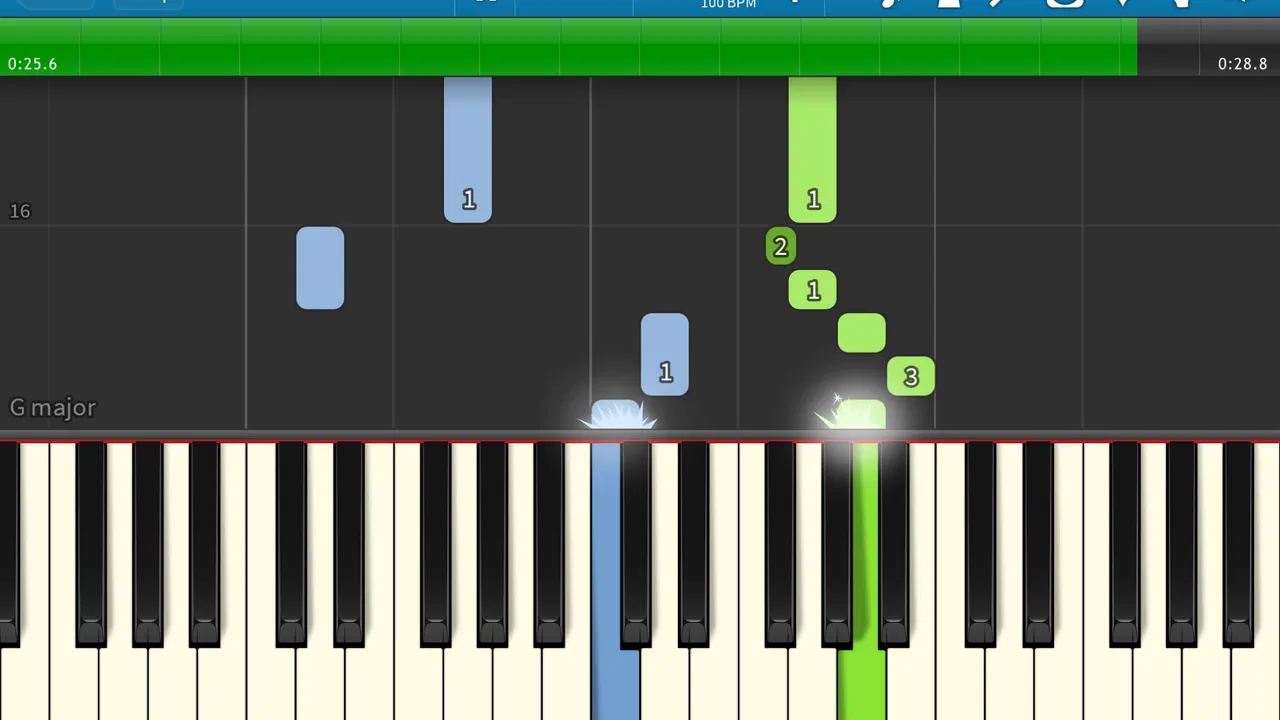
I spent time with Synthesia as a piano-learning app, and its central idea is immediately clear: notes move toward a keyboard-like guide, and I play them as they arrive. That visual approach makes practice feel more like following a rhythm game than reading a traditional lesson book. It is approachable, especially when I want to sit down and start playing without first learning how to interpret dense sheet music.
That simplicity is also the reason I would not recommend it equally to everyone. Synthesia is strongest when I already have access to a piano or keyboard and want a visual practice companion. It is less convincing as a complete replacement for a teacher, a structured music course, or a method that explains technique in depth. The app can show me what to play, but I still need to develop the habits that make playing sound relaxed and musical.
How the falling-note approach feels in real practice
The falling-note presentation gives me an immediate sense of timing. Instead of staring at a page and translating symbols, I can watch the notes approach their targets and coordinate my hands with the movement. For a beginner, that lowers the initial barrier considerably. I can understand the next action visually, even before I feel comfortable with conventional notation.
You May Also Like

 Blood Strike: 2.5 Anniversary
Blood Strike’s Loadouts Turn Every Drop Into a Tactical Gamble
A close look at Blood Strike’s custom loadouts: how fast access to signature weapons reshapes its battle royale rhythm, rewards preparation, and narrows the gap between fights.

 Pandora - Music & Podcasts
Pandora’s Music Is Easy to Start, but Harder to Recover
Pandora’s strength is its low-effort path from a seed to a station. Its weak spot is how much confidence it asks you to place in connection, setup, and quiet recovery.

 8 Ball Pool
 Is Built on Rivalries, Rematches, and Routine
A close look at the rivalries, rematches, shared routines, and unanswered safety questions that turn a quick pool match into a persistent mobile community.

 Samsung Music
’s Quiet Strength Is Playing What You Already Own
Its reach comes less from spectacle than from dependable access to a personal library. That simplicity is both the app’s strongest retention engine and its ceiling.

 AccuWeather: Weather Radar
AccuWeather Review: A Quick, Clear Forecast for Everyday Decisions
For everyday plans, the best forecast is the one you can understand quickly. AccuWeather makes rain timing, radar, and local conditions easy to act on, with a few trade-offs.

 Hill Climb Racing
Why Hill Climb Racing Still Turns Crashes Into One More Run
A tiny car, a bumpy hill and one more upgrade: Hill Climb Racing keeps resurfacing because its simple chaos makes every near-miss feel personal.
More From Our News Desk



In everyday use, I found this most useful for short, repeatable sessions. I might have a little time after work, open the app, choose a piece, and focus on one passage rather than attempting a full lesson. The visual lane makes it easy to identify where I am struggling: perhaps my left hand is late, or I keep missing a repeated pattern. That makes practice less vague than simply playing a song from beginning to end and hoping it improves.
The approach also suits learners who stay motivated through visible progress. Seeing notes arrive creates a clear task, and successfully getting through a difficult section feels tangible. The app is best understood as a guided practice screen, not as a complete piano teacher. That distinction matters because visual accuracy and good musicianship are related, but they are not identical.
What I need before the first useful session
A touchscreen can help me explore the interface, but serious practice is much more comfortable with a real piano or electronic keyboard. A phone or tablet can display the notes, yet tapping a glass screen does not give the same feedback as pressing weighted or unweighted keys. If I am deciding whether to use Synthesia, I would first consider the instrument I plan to pair with it and where that instrument is located.
The app belongs to the Music & Audio category and is developed by Synthesia LLC. It is free to install, with in-app purchases listed at $7.99 per item. That makes it easy to try without committing immediately, although I would still approach the purchase decision carefully: the value depends on whether the available material and learning flow match my goals, not simply on the low entry cost.
It is rated for Everyone, which fits the straightforward presentation and broad appeal. The current version is 10.10.6001, and it runs on Android 6.0 or later. Those details make it accessible on a wide range of devices, though an older phone may still feel cramped if I am trying to read several moving notes at once.
Where connectivity changes the experience
Network access becomes most noticeable around the moments when I am opening the app, selecting material, or moving between parts of the experience. A stable connection makes those transitions feel less distracting. When I am ready to practice, even a small delay can break my concentration because the whole appeal is immediate visual feedback.
I would not plan a practice routine around an assumption that every part works without a connection. Instead, I would test the exact pieces I intend to use before leaving home. If I am preparing for a train ride or a place with unreliable reception, I would open the app beforehand, check that the selected material is ready, and avoid discovering a connectivity problem only after I have set up at the keyboard.
This is an important difference from a printed method book. A book is always available once I own it, while an app experience can involve loading, account-related steps, or access to material that depends on the current connection. I like the convenience of digital guidance, but I have to treat connectivity as part of the setup rather than an invisible detail.
Using it on a phone, tablet, or shared piano
Screen size has a practical effect on this particular app. On a phone, the display is convenient for quick checks, but the falling notes can become visually crowded when both hands are active. A tablet is more comfortable for longer sessions because I can see the lanes and timing relationship without constantly leaning forward or losing the next target.
That makes Synthesia a good companion for a living-room keyboard, a compact digital piano, or a lesson space where I can place a device nearby. It is less convenient if my instrument is in a location with poor reception or if I have to balance the phone somewhere unsafe. I would rather spend a minute arranging the device at eye level than practice while twisting my neck toward a low table.
There is also a social advantage to the mobile format. I can show a family member what I am learning, let a child try a simple passage, or use a short session as a low-pressure introduction to the piano. At the same time, the phone brings familiar distractions. Notifications, calls, and the temptation to switch apps can interrupt the rhythm more easily than a dedicated music book.
For that reason, I prefer a deliberate mobile routine: silence notifications, place the device securely, choose one manageable goal, and stop when that goal is complete. This is more effective than opening the app casually and allowing the session to become a mixture of browsing and unfocused repetition.
Recovering when practice goes wrong
One of the useful consequences of the visual format is that mistakes are easy to locate. If I miss a note, I can usually identify whether the problem was timing, hand coordination, or simply losing sight of the next target. I then restart a small section rather than replaying the entire piece. That is a much better use of time than repeatedly beginning at the opening and hoping the difficult bar fixes itself.
My practical recovery method is to reduce the ambition of the session. I focus on the troublesome movement, keep my hands relaxed, and repeat it slowly enough to understand what is happening. Once the pattern feels dependable, I return to the surrounding passage. The app provides the visual sequence, but the decision to isolate a problem belongs to me.
Connectivity failures require a different kind of recovery. If material does not load or the app behaves unexpectedly, I would first avoid repeatedly tapping through the same screen. I close the distraction, check the connection, reopen the app, and confirm whether the selected practice content is available before sitting down again. If I am in a hurry, I switch to a familiar exercise or a piece I already know rather than turning a short practice window into technical troubleshooting.
This is where a physical book or downloaded reference can still be more dependable. A printed page cannot suddenly wait for a network response. Synthesia offers a more engaging visual path, but that convenience comes with a small amount of digital fragility. I can live with that as long as I keep a backup plan for important practice sessions.
Keeping data use sensible during regular practice
Because the app is designed around visual content and digital access, I would avoid treating mobile data as unlimited by default. My habit would be to prepare sessions while connected to trusted Wi-Fi, then keep the actual practice focused on the material I have already selected. I would also pay attention to how often I browse or change content, since repeated loading is more likely to consume data than a short, settled session.
This is not only about saving data. Preparing in advance reduces interruptions. When I already know which song or passage I want to work on, I spend more time playing and less time navigating. It also helps when I am using a tablet away from home or relying on a phone connection that may be inconsistent.
I would still review the device’s normal app and network settings rather than making assumptions. Android’s own data controls can show how much an app is using, and those controls are useful if I practice frequently while away from Wi-Fi. The goal is not to overcomplicate the experience; it is simply to notice whether convenience is quietly turning into unnecessary background usage.
Privacy and data concerns are also a reason to keep expectations realistic. Synthesia is not a standalone keyboard sitting on a shelf; it is software that may need network interaction for parts of the experience. I am comfortable using it, but I prefer to make connectivity choices consciously, especially when practicing with a limited mobile plan or in a household where several devices share the same connection.
Three practice habits that make it more useful
First, I would use the falling notes to diagnose timing rather than merely chase them. If I keep missing a passage, I ask whether I am watching too far ahead, reacting too late, or trying to play faster than my hands can manage. That turns the display from a passive animation into a feedback tool.
Second, I would alternate between visual guidance and listening. Following the screen can make me concentrate so hard on accuracy that I forget phrasing and dynamics. After working through a section, I play it again while paying attention to whether the melody has shape and whether the accompaniment is overpowering it. This is the point where a visual learning app needs my musical judgment.
Third, I would use the app as a bridge into notation rather than avoiding notation forever. The falling-note system is welcoming, but a player who wants to read new music independently will eventually benefit from learning traditional symbols, rhythm values, and key relationships. Synthesia can make the first stage less intimidating, while a method book or teacher can fill in the theory and reading skills it does not replace.
How it compares with familiar alternatives
Compared with a traditional piano method book, Synthesia feels more immediate and less abstract. I receive a moving visual target instead of a static page, which is especially helpful when I am unsure where a note sits on the keyboard. The trade-off is that a book often explains posture, fingering, rhythm, and musical vocabulary in a more deliberate way. If I want a complete curriculum, the book has an advantage.
Compared with video lessons, the app is more interactive during the actual playing moment. A video can demonstrate hand position and musical expression, but I may have to pause and rewind constantly. Synthesia keeps the next notes in front of me. Video instruction remains better when I need to see a teacher explain technique, diagnose tension, or demonstrate why a passage should be shaped a certain way.
Compared with a private teacher, the app is obviously more flexible and less intimidating for casual practice, but it cannot observe my posture or correct habits in real time. A teacher can adapt a lesson to my weaknesses and choose material that develops balanced skills. I would use Synthesia alongside instruction if I had access to it, not as a substitute for expert feedback.
Compared with simply playing along to recordings, the app gives me a clearer visual map and a more controlled practice target. Recordings are better for developing musical memory and listening, while the falling-note approach is better for coordinating a specific sequence. Combining both methods produces a more rounded routine than relying on either one alone.
Who should use it, and who should skip it?
I think Synthesia is a strong match for beginners who feel blocked by sheet music, returning players who want a gentle way back to the keyboard, and families looking for an approachable introduction to piano practice. It also suits people who enjoy game-like visual feedback and prefer short, concrete tasks over long theoretical explanations.
I would be more cautious if the main goal is classical sight-reading, advanced technique, improvisation, or exam preparation. Those goals require skills that extend beyond following falling notes. I would also skip it if I do not have regular access to a piano or keyboard, because the app’s value is tied to turning visual instructions into physical playing rather than merely watching them.
The free starting point makes experimentation easy, while the optional purchases mean I can decide whether the experience earns a place in my routine. I would not buy anything simply because the visual presentation is appealing. I would first establish a habit, confirm that my device and connection work well in the room where I practice, and then decide whether the additional material supports a clear musical goal.
My connectivity verdict
Synthesia works best when I treat it as a prepared digital practice station. I want a reliable connection for setup and access, a screen large enough to follow comfortably, and a real keyboard ready to play. Once those pieces are arranged, the falling-note system makes short sessions inviting and gives beginners a concrete way to understand timing.
Its limitations are equally practical. Network interruptions can disrupt momentum, mobile screens can feel cramped, and the app does not replace instruction about posture, expression, or broader musicianship. A printed method, video lesson, or teacher may be the better choice when those needs come first.
Still, I would recommend trying it to a friend who owns a keyboard and wants an uncomplicated way to start practicing. With sensible preparation for connectivity, careful control of mobile data, and a willingness to use listening and notation alongside the visual guide, it becomes more than a novelty. It is a convenient entry point into piano practice, provided I remember that the screen can guide my hands but cannot do the learning for me.
Since its release on December 18, 2014, the app has grown to over ten million installs, with an average rating of 3.8 from around ninety-one thousand ratings and roughly five thousand three hundred reviews. Those figures suggest broad interest alongside a mixed experience, which matches my own conclusion: Synthesia is worth trying for visual, flexible piano practice, but its usefulness depends heavily on the instrument, screen, and connectivity around it.
FAQs for Synthesia
01What is Synthesia, and how does it work?
Synthesia is an AI-driven video creation platform that allows users to produce professional-quality videos without the need for cameras, microphones, or studios. By simply typing in your script, Synthesia generates video content featuring realistic AI avatars who deliver your message in the language and style of your choice.
02Can I customize the avatars and voices in Synthesia?
Yes, Synthesia offers a range of customization options for both avatars and voices. Users can select from various pre-designed avatars or upload custom ones. Additionally, Synthesia provides multiple voice options and languages, allowing you to tailor the video to your audience’s preferences.
03Is Synthesia suitable for businesses and educational purposes?
Absolutely! Synthesia is widely used by businesses and educational institutions to create engaging content for marketing, training, and learning. Its ease of use and ability to produce high-quality videos quickly make it an excellent tool for presentations, tutorials, and corporate communications.
04What are the system requirements for using Synthesia?
Synthesia is a cloud-based application, meaning you don't need high-end hardware to use it. It can be accessed from any modern web browser on both desktop and mobile devices. A stable internet connection is recommended for the best experience, especially when rendering videos.
05Is there a free version of Synthesia available?
Synthesia offers a free trial version that allows users to explore its features with some limitations. For full access to all functionalities, including advanced customization and export options, a subscription to one of their paid plans is required. Pricing details are available on their official website.
Pros
- Intuitive interface for easy video creation.
- Wide range of customizable avatars.
- Supports multiple languages for global reach.
- High-quality video output with realistic avatars.
- Integrates well with other software and tools.
Cons
- Limited free version features.
- Occasional delays in video rendering.
- Customization options can feel overwhelming.
- Requires stable internet for optimal performance.
- Subscription can be pricey for individual users.

Synthesia
Gallery